Meta Pixel Helper Guru – Test and Debug Your Tracking
See every Meta Pixel event a website sends, check whether browser and server events are deduplicated, estimate Event Match Quality, and get step-by-step fixes, all in Chrome's side panel.
Audits are processed in your browser · No account needed for the free plan · Not affiliated with Meta
What Is Meta Pixel Helper Guru?
"Meta Pixel Helper" is what most people search for when they want to check whether a website's Meta Pixel (formerly the Facebook Pixel) works. Meta's own free helper shows which pixels a page loads and whether they fired.
Meta Pixel Helper Guru is an independent pixel helper for Chrome that answers the next questions too: are browser and server events deduplicated, how good is the customer data for matching, does every step of the funnel send the right values, and what exactly should be fixed?
It is built for media buyers, agencies, developers and Shopify or WooCommerce store owners who need every conversion to reach Meta once, with good match data.
| Check | Basic pixel helper | Pixel Helper Guru |
|---|---|---|
| Pixels found and events fired | ✓ | ✓ |
| Event parameters | ✓ | ✓ |
| Pixel Health score and ranked issues | – | ✓ |
| Browser vs server deduplication | – | ✓ |
| Estimated Event Match Quality | – | ✓ |
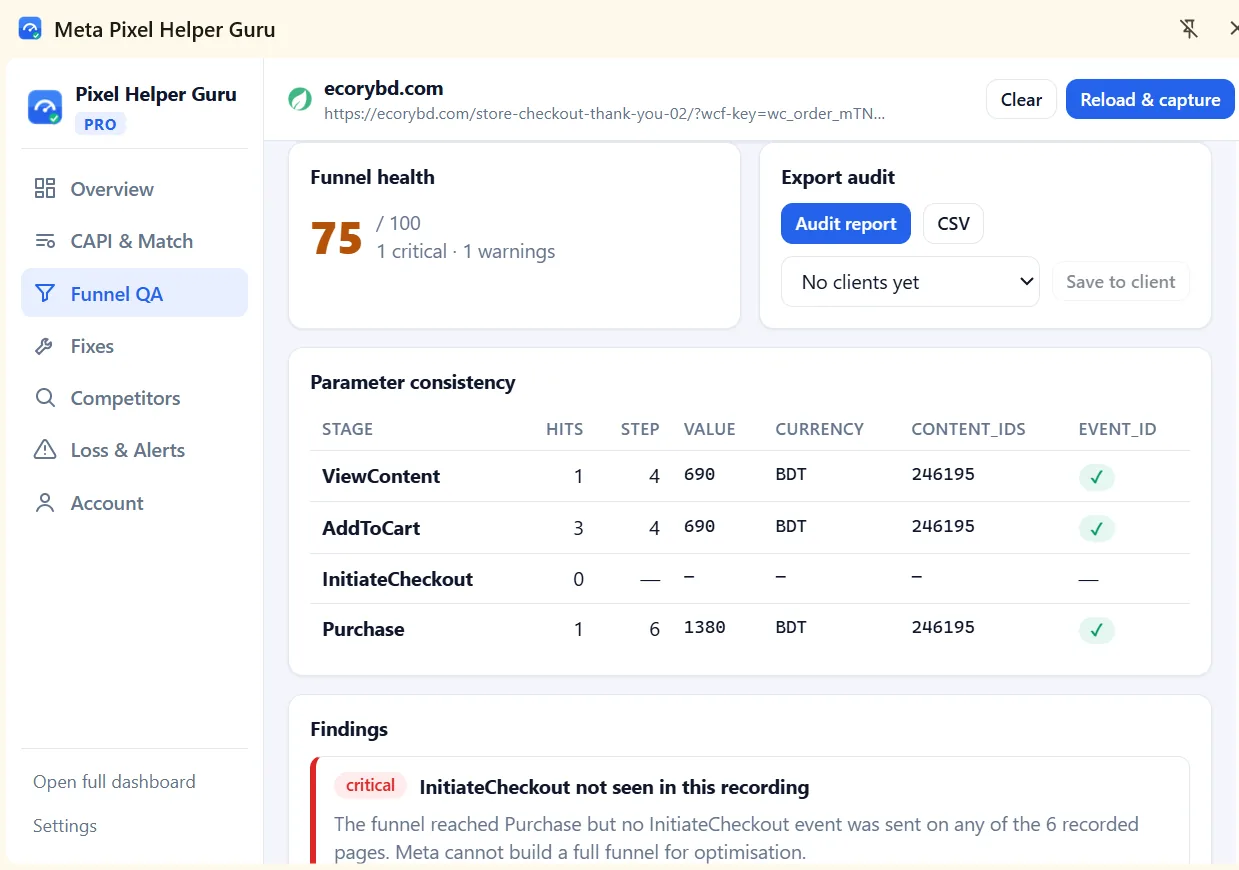
| Multi-page funnel QA | – | ✓ |
| Fix guides and audit reports | – | ✓ |
Check Facebook Pixel Events in Your Browser
Open the side panel on any site and watch its Meta Pixel work in real time. No account or sign-up needed.
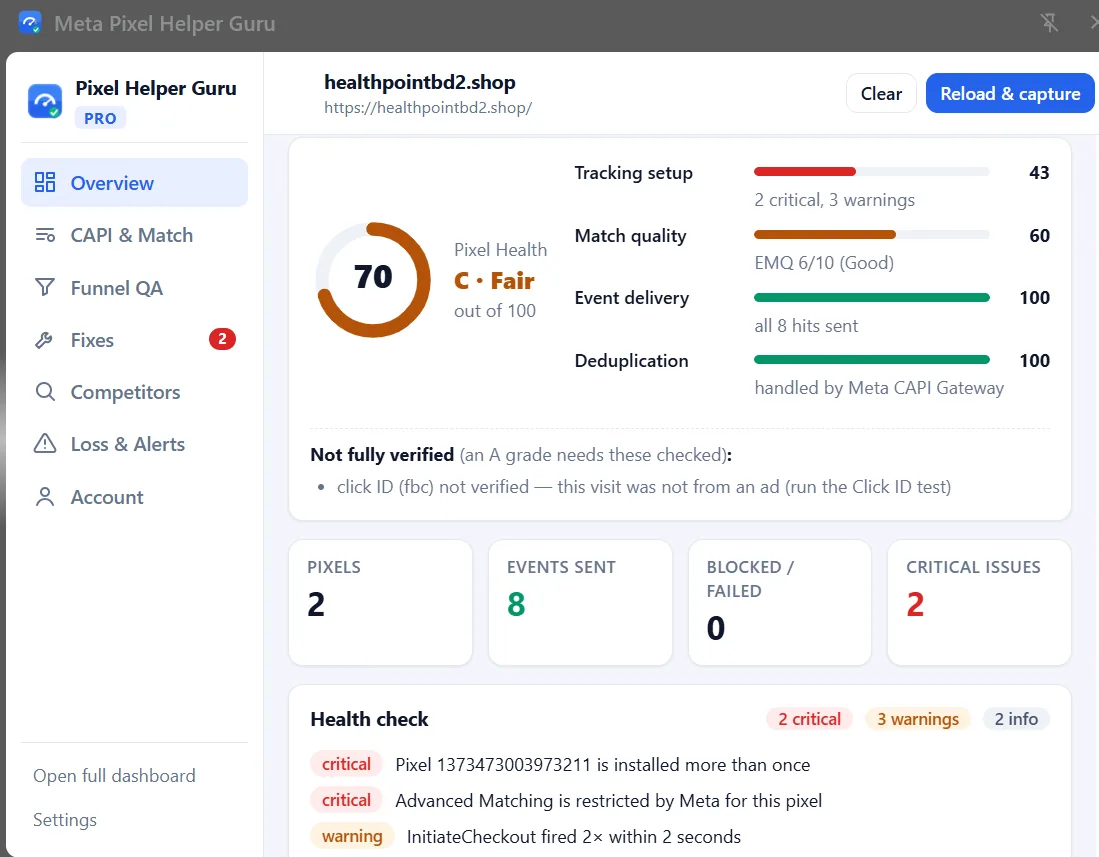
- Every pixel on the page, with its ID and whether it is installed more than once.
- Every event as it fires: PageView, ViewContent, AddToCart, InitiateCheckout, Purchase and custom events.
- Parameters and details such as value, currency, content IDs, setup method and load time.
- Delivery status for each request: sent, blocked or failed.
- A Pixel Health score and funnel recording across up to 3 pages.
Find and Fix Meta Pixel Tracking Issues
Each check explains what it found, why it matters for your ad results, and what to change.
Pixel Health score Free
One grade out of 100 built from tracking setup, match quality, event delivery and deduplication, with a list of what still needs checking for an A.
Live event capture Free
See every pixel, event and parameter as it fires, with sent, blocked or failed status, setup method and load time.
CAPI deduplication audit Pro
Pairs browser events with the server events the extension can observe, by event_name and event_id, so you see which are deduplicated, browser-only or server-only.
Event Match Quality estimate Pro
Estimated browser and server EMQ per event, plus a parameter matrix (email, phone, fbc, fbp, IP and more) showing what is missing and how it should be hashed.
Funnel QA 3 pages free
Record a journey from product page to thank-you page. Checks value, currency, content_ids and event_id at every stage and flags missing steps.
Fix guides Pro
Every issue comes with its evidence, why it hurts results, and the fix: corrected fbq code, an importable GTM container, or Shopify and WooCommerce steps.
Competitor tracking overview Pro
See how other stores you visit set up Meta tracking: pixel IDs, Dynamic Product Ads, CAPI, Advanced Matching, catalogs and changes over time. Stored only on your computer.
Ad-blocker test & loss simulator Pro
Block the pixel on one tab to see which events still arrive through server-side tracking, then estimate the conversions and revenue Meta may miss.
Alerts & uptime monitor Pro
Desktop alerts when a Purchase fails or tracking code throws an error, and scheduled checks that warn you when a page loses its pixel (while Chrome is open).
Client-ready audit reports Pro
PDF, CSV and JSON exports with severity, evidence and fixes. Compare against an earlier audit to show what was fixed.
White-label & workspaces Pro
Put your agency name and logo on reports, and keep saved audits organised in a workspace per client.
CAPI test events Pro
Send a deduplicated test event through the Graph API with your test_event_code, then confirm it in Meta Events Manager.
Inside the Meta Pixel Helper Chrome Extension
Each tab of the side panel answers one question about a site's tracking. Select a tab to see it.
How to Use the Pixel Helper Extension
Your first audit takes about a minute.
Install from the Chrome Web Store
Add the Pixel Helper Chrome extension to Chrome. The free plan needs no account.
Open the site to check
Go to the website whose Meta Pixel you want to inspect, such as a product page.
Open the side panel
Click the toolbar icon, then Reload & capture so every event is recorded from the start of the page.
Browse the funnel
Add to cart and go through checkout. Events and parameters appear as they fire.
Review and fix
Read the Pixel Health score and warnings, follow the fix guides, then confirm in Meta Events Manager.
Chrome Web Store listing: the install link will be published here once the listing is live.
See plans and pricingCompare Browser and Server Events on WordPress
The free Pixel Helper Guru Connector plugin keeps a short, sanitized log of the Conversions API events your WordPress site sends, so the extension can compare them with browser events.
- Works with Facebook for WooCommerce and other plugins that send CAPI events through the WordPress HTTP API.
- No raw personal data stored. Only presence, hash status and a short hash preview are kept; IPs are masked and access tokens dropped.
- Protected by a per-site key and read-only. Logs expire after 48 hours by default.
- Flags real problems: rejected events, hashing errors and duplicate server senders.
Meta's CAPI Gateway and off-site servers such as Stape can't be logged by the plugin.
Download the WordPress plugin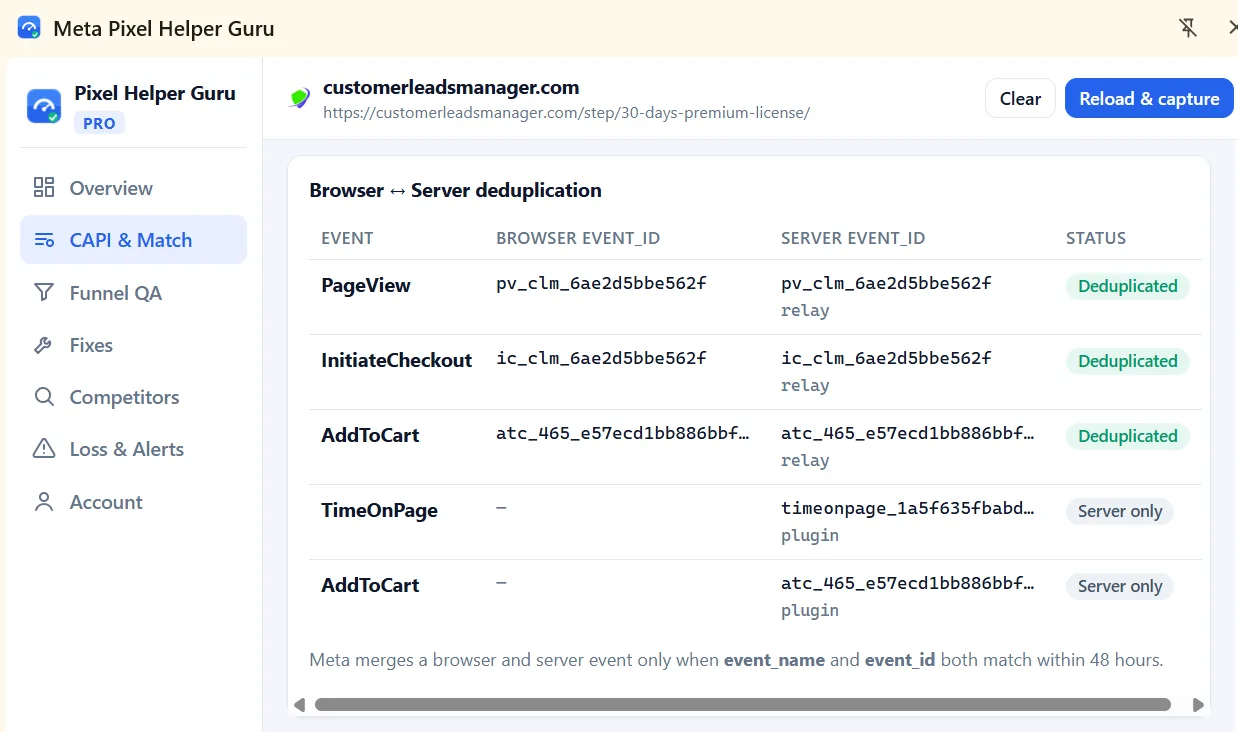
Pixel Helper Guru Pricing
Start free. Both Pro plans unlock every feature; they differ only in length.
Free
- Pixel detection and Pixel Health score
- Every event and parameter, live
- Sent, blocked and failed status
- Funnel recording up to 3 pages
- CAPI deduplication & EMQ
- Fix guides, reports & alerts
Pro · 1 month
- Everything in Free
- Unlimited funnel recording
- CAPI deduplication & EMQ
- Fix guides & GTM container
- Competitors, alerts & monitor
- White-label reports & workspaces
Pro · 6 months
- Everything in Free
- Unlimited funnel recording
- CAPI deduplication & EMQ
- Fix guides & GTM container
- Competitors, alerts & monitor
- White-label reports & workspaces
Checkout by Lemon Squeezy. Your license key arrives by email; paste it in the extension under Account. One key works on one browser at a time.
| Feature | Free | Pro |
|---|---|---|
| Pixel detection, pixel IDs and Pixel Health score | ✓ | ✓ |
| Events, parameters and event details (setup method, location, load time) | ✓ | ✓ |
| Sent / blocked / failed status | ✓ | ✓ |
| Funnel recording | 3 pages | Unlimited |
| event_id checks, match keys and fbp / fbc validation | – | ✓ |
| CAPI deduplication audit (event_name + event_id) | – | ✓ |
| Estimated Event Match Quality and parameter matrix | – | ✓ |
| Deduplicated CAPI test event | – | ✓ |
| Fix guides: fbq code, GTM container, Shopify / WooCommerce steps | – | ✓ |
| Competitor tracking overview and change history | – | ✓ |
| Ad-blocker resilience test and conversion-loss simulator | – | ✓ |
| Desktop alerts and pixel uptime monitor | – | ✓ |
| PDF / CSV / JSON audit reports with before/after comparison | – | ✓ |
| White-label reports and client workspaces | – | ✓ |
| Server event log via the WordPress plugin | – | ✓ |
Permissions and Data Handling
Audits are processed and stored in your browser. Here is why the extension asks for each permission. Full details are in the privacy policy.
Read data on websites you visit
Needed to see Meta Pixel requests and fbq() calls from the moment a page starts loading. Requests are only observed. The one exception is the ad-blocker test you start, which blocks the pixel on that tab until you stop it.
Cookies
Reads the site's _fbp cookie to match server events. The Click ID test sets a temporary _fbc cookie and restores the original afterwards.
Storage, alerts and schedules
Saves settings, your license status and audit history on your computer, shows optional desktop alerts, and runs the uptime monitor and license check on a schedule.
Personal data is redacted
Emails, phone numbers and names found in tracking requests are replaced with [redacted] before anything is saved.
What leaves your computer
Your license key goes to Lemon Squeezy to check it. Test events go to Meta only when you send one. Your own WordPress site is contacted only if you connect the plugin.
You stay in control
Turn off competitor profiles, alerts and monitoring in Settings, or delete all extension data in one click.
Frequently Asked Questions About Pixel Helper
What is Meta Pixel Helper?
Meta Pixel Helper is the name of Meta's free Chrome extension, which shows which Meta Pixels a page loads and whether they fired. Meta Pixel Helper Guru is a separate, independent Chrome extension for the same job that adds deeper audits: Conversions API deduplication checks, estimated Event Match Quality, funnel QA and fix guides.
How does a Pixel Helper extension work?
It watches the requests a page sends to Meta and the page's fbq() calls while you browse. Meta Pixel Helper Guru reads these in your browser, lists each pixel, event and parameter, and checks them against common setup mistakes.
Is this a Facebook Pixel Helper?
The Meta Pixel was called the Facebook Pixel before Facebook's parent company became Meta, so many people still search for a Facebook Pixel Helper or FB Pixel Helper. Meta Pixel Helper Guru works with that same pixel, but it is not Meta's own tool. It is an independent alternative.
How do I use a Pixel Helper Chrome extension?
Install the extension, open the website you want to check, and click the toolbar icon to open the side panel. Click Reload & capture so events are recorded from the start of the page, browse through the funnel, then read the Overview and Fixes tabs.
Can a Pixel Helper detect Meta Pixel events?
Yes. Meta Pixel Helper Guru detects standard events such as PageView, ViewContent, AddToCart, InitiateCheckout and Purchase, as well as custom events. It shows their parameters and whether each request was sent, blocked or failed. This is included in the free plan.
Can a browser extension verify Conversions API events?
Not on its own. Conversions API events travel from the website's server directly to Meta, so no browser can see them. Meta Pixel Helper Guru compares browser events with the server events it can observe: first-party relay traffic visible in the browser (such as server-side GTM or Stape), a CAPI payload you paste in, or the log from its WordPress plugin. It cannot confirm that Meta received or accepted an event. Use Test Events in Meta Events Manager for that.
What should I do if my Meta Pixel is not firing?
First check that the pixel is detected on the page at all. Then check whether its requests are blocked or failing, for example by an ad blocker, a consent banner or a content security policy, and whether the tracking code throws JavaScript errors. Make sure each event fires on the right page, and look for duplicate base code. When the extension shows the events firing correctly, confirm them in Meta Events Manager.
Is Pixel Helper Guru an official Meta product?
No. Pixel Helper Guru is an independent tool and is not affiliated with, endorsed by, or sponsored by Meta Platforms, Inc. The words Meta and Facebook are used only to describe which pixel the extension works with.
Is the Event Match Quality score the same as Meta's?
No. It is an estimate weighted by Meta's published parameter priorities, so you can find gaps before Meta reports them. Meta's own score appears in Events Manager after your events are processed.
Does it work on Shopify, WooCommerce and custom sites?
Yes. It audits any website that runs the Meta Pixel, whether the pixel was added by hand, through Google Tag Manager or by a platform integration. Fix guides include steps for Shopify and WooCommerce.
Is there a free trial, and can I use one license on two computers?
There is no trial, but the free plan does not expire, and Pro starts at $3 for one month. A license key works on one browser at a time. To move it, deactivate it under Account on the old browser, then activate it on the new one.
Start Debugging Your Meta Pixel
Inspect events for free. Upgrade when you need deduplication, match quality and fix guides.
Get the Chrome extension