 Pixel Helper Guru
Facebook Pixel Helper: What It Is and How It Works
A Facebook Pixel Helper is a browser extension that shows what a website's Facebook (now Meta) Pixel is doing: which pixels are on the page, which events they send, and what data goes with them. Here's how these tools work, how to install one, and where their view ends.
Facebook Pixel Helper or Meta Pixel Helper?
They're the same thing under two names. The Facebook Pixel is the snippet of JavaScript that advertisers put on their websites so Facebook and Instagram ads can measure visits, add-to-carts and purchases. After Facebook's parent company renamed itself Meta, the Facebook Pixel became the Meta Pixel, and Meta's official helper extension became Meta Pixel Helper.
The code didn't change. Sites still load fbevents.js, call fbq('track', …), and send events to facebook.com/tr. That's why people still search for "Facebook Pixel Helper" or "FB Pixel Helper", and why any pixel helper works on sites set up years ago.
Besides Meta's own extension, there are independent tools for the same pixel. Pixel Helper Guru is one of them. It isn't made by Meta; it reads the same pixel and adds deeper checks.
How a pixel helper works
When a page with a Meta Pixel loads, three things happen:
- The page loads Meta's script,
fbevents.js, and creates thefbq()function. - The site's code calls
fbq('init', 'PIXEL_ID')and thenfbq('track', 'PageView'), plus other events as the visitor browses. - For each event, the browser sends a small request to
facebook.com/trwith the event name, the pixel ID and parameters such asvalue,currencyandcontent_ids.
A pixel helper watches those calls and requests from inside your browser and turns them into a readable list. It doesn't change the site, and it doesn't need access to the site's Meta ad account. That's why you can check any website, including competitors' sites, and why it works for agencies auditing a new client before they get account access.
What a pixel helper shows you
- Pixels on the page: each pixel ID, and whether the same pixel is installed twice.
- Events: standard events such as PageView, ViewContent, AddToCart, InitiateCheckout, Lead and Purchase, plus custom events.
- Parameters: what each event sends, for example
value: 64.00,currency: USDorcontent_ids: ['SKU-1042']. - Errors: problems such as a pixel that didn't load or an event that couldn't be sent.
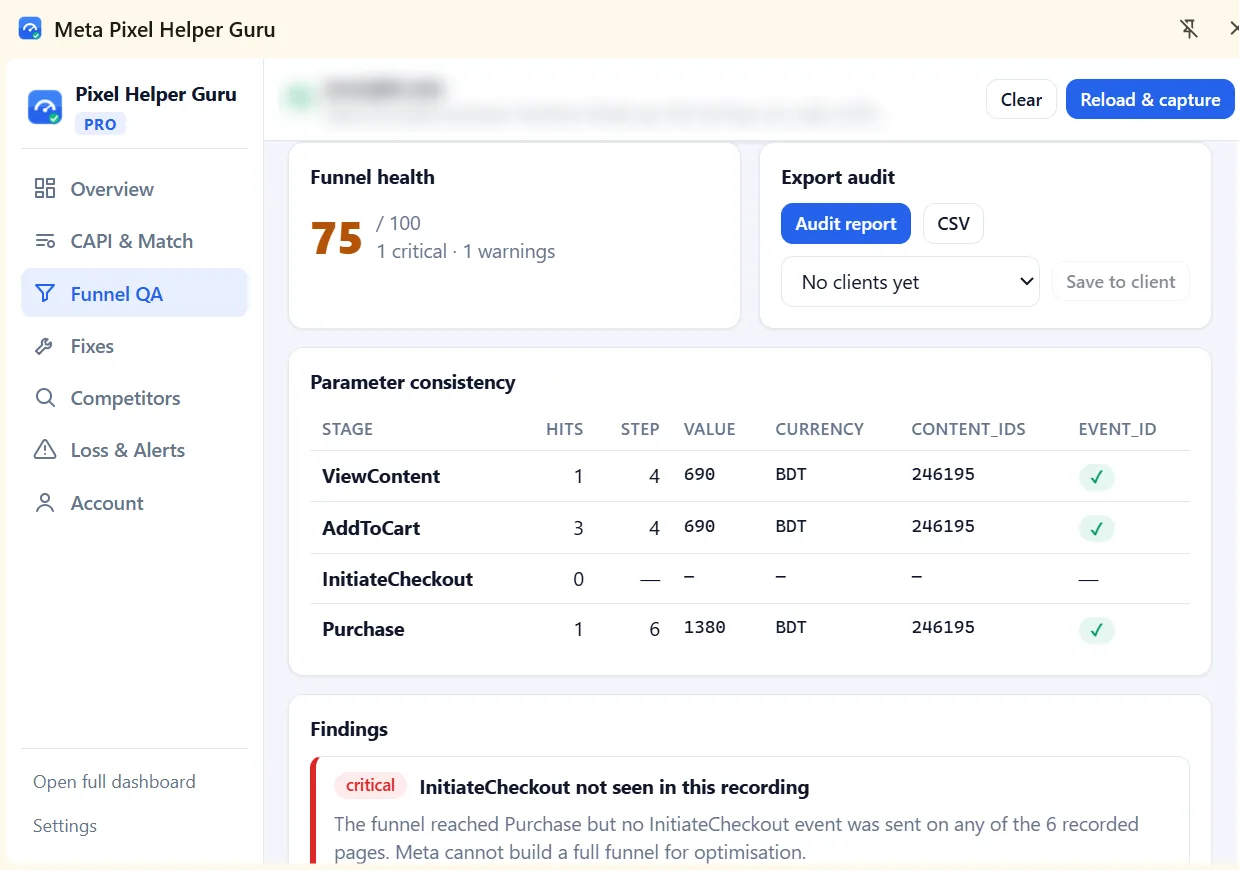
Pixel Helper Guru shows the same live list for free and adds a Pixel Health score, the delivery status of every request (sent, blocked or failed), and a funnel recording across several pages.
How to install a Facebook Pixel Helper in Chrome
- Open the Chrome Web Store page for the helper you want. For Pixel Helper Guru, that's this listing.
- Click Add to Chrome, then Add extension.
- Click the puzzle icon in Chrome's toolbar and pin the extension so its icon is always visible.
- Open any website and click the icon. Pixel Helper Guru opens in Chrome's side panel; click Reload & capture so events are recorded from the very start of the page.
For a complete walkthrough of testing a store, from product page to purchase, see how to use a Meta Pixel Helper step by step.
Check your own pixel in a minute. The free plan shows every event, parameter and delivery status, with no account needed.
Add to Chrome, it's freeWhat a pixel helper can't see
A pixel helper sees what happens in your browser. Some important parts of tracking happen elsewhere:
- Conversions API (server) events. Many stores also send events from their server directly to Meta. Those never pass through your browser, so a basic helper can't see them or check that they're deduplicated with browser events. Pixel Helper Guru checks the server events it can observe, such as first-party relays (server-side GTM, Stape), a pasted CAPI payload or its WordPress plugin log. Our CAPI deduplication guide explains why this matters.
- What Meta did with the event. A helper can show that an event was sent; only Meta Events Manager shows that it was received, matched and attributed. Use its Test Events tool to confirm.
- Other visitors. You see your own visit. A visitor with an ad blocker or a declined consent banner may send nothing at all.
If your helper shows no pixel or no events, work through our Facebook Pixel not working checklist. If you're comparing tools, read what a Meta Pixel Helper alternative adds.