 Pixel Helper Guru
Meta Pixel and Conversions API Deduplication, Explained
Most stores now send their conversions to Meta twice: once from the visitor's browser through the Meta Pixel, and once from their server through the Conversions API (CAPI). That's the recommended setup, but only if Meta can tell that both copies are the same event. This guide explains how deduplication works, how it goes wrong, and how to check it.
Why send events from both the browser and the server?
Browser events are easy to set up and carry useful signals such as the _fbp and _fbc cookies. But they're fragile: ad blockers, privacy browsers, consent choices and visitors who close the tab early all stop some of them.
Server events, sent with the Conversions API, don't depend on the visitor's browser. They arrive even when the pixel is blocked, and the server can include customer details from the order, such as a hashed email. Sending both gives Meta the most complete picture, which is why Meta recommends a "redundant" setup.
The catch: if both copies of a Purchase arrive and Meta can't link them, it can count two purchases. Reported conversions and ROAS go up, cost per purchase looks lower than it is, and campaigns optimize on wrong numbers.
How Meta deduplicates events
Meta's recommended method uses two fields:
- Event name: the browser's
fbq('track', 'Purchase', …)and the server's"event_name": "Purchase"must be the same. - Event ID: the browser sends it as
eventIDin the fourth argument offbq, and the server asevent_id. The values must be identical.
Browser:
fbq('track', 'Purchase', { value: 64.00, currency: 'USD' }, { eventID: 'order-10482' });
Server (Conversions API):
{ "event_name": "Purchase", "event_id": "order-10482", "action_source": "website", … }
When Meta receives a browser and a server event with the same name and ID from the same pixel within a short window (Meta documents 48 hours), it keeps one and discards the other. A good event ID is unique per event, such as the order number for Purchase, and generated once so both sides can use it.
How deduplication goes wrong
- No event ID on the browser event. Common with hard-coded snippets and older themes. The server copy can't be linked to anything.
- Different IDs on each side. For example, the browser uses a random ID while the server uses the order number, or each side generates its own random value.
- Different event names.
Purchasein the browser andpurchaseorOrder Completedon the server. - Two server senders. A platform integration and a plugin (or server-side GTM) both send the server Purchase, with different IDs.
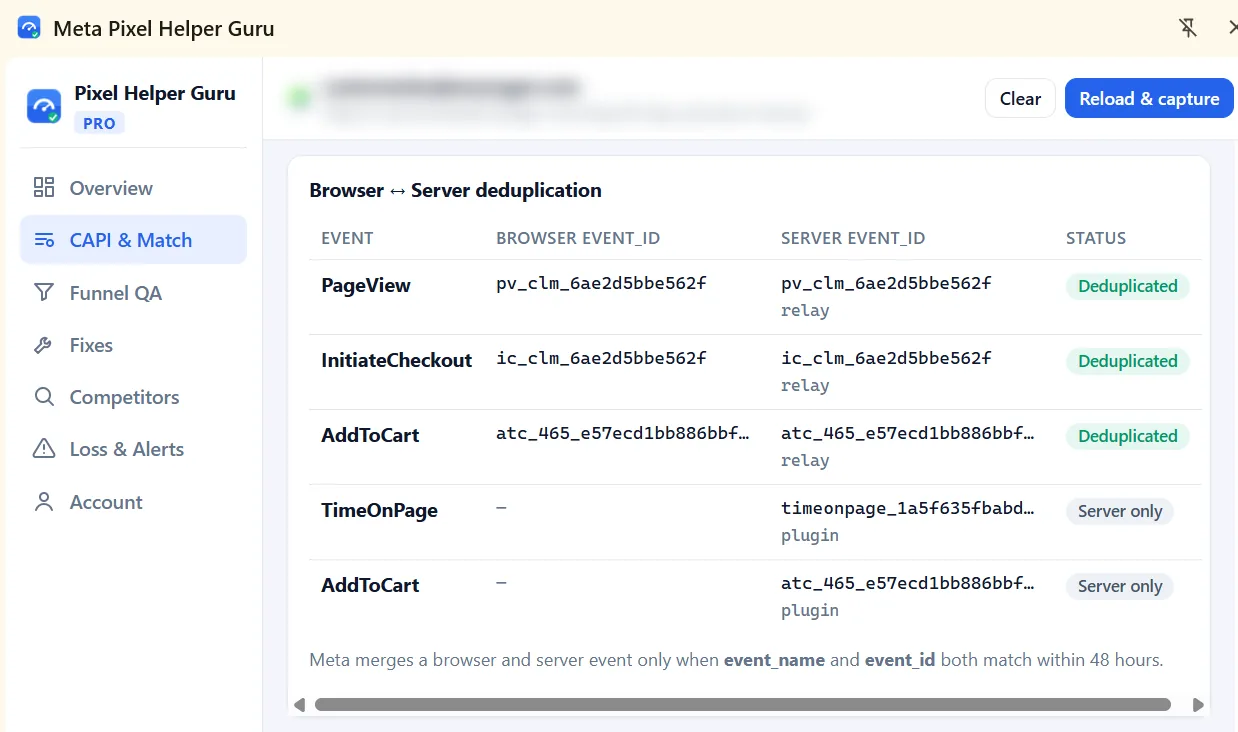
- Only some events are deduplicated. Purchase is set up correctly, but AddToCart and InitiateCheckout aren't, which skews funnel reporting.
In Events Manager, look at each event's overview: if it reports received browser and server events but little or no deduplication, it's worth investigating.
See which of your events are deduplicated, browser-only or server-only. The deduplication audit is part of Pro, from $3 for a month.
Add to Chrome, it's freeDeduplication and Event Match Quality
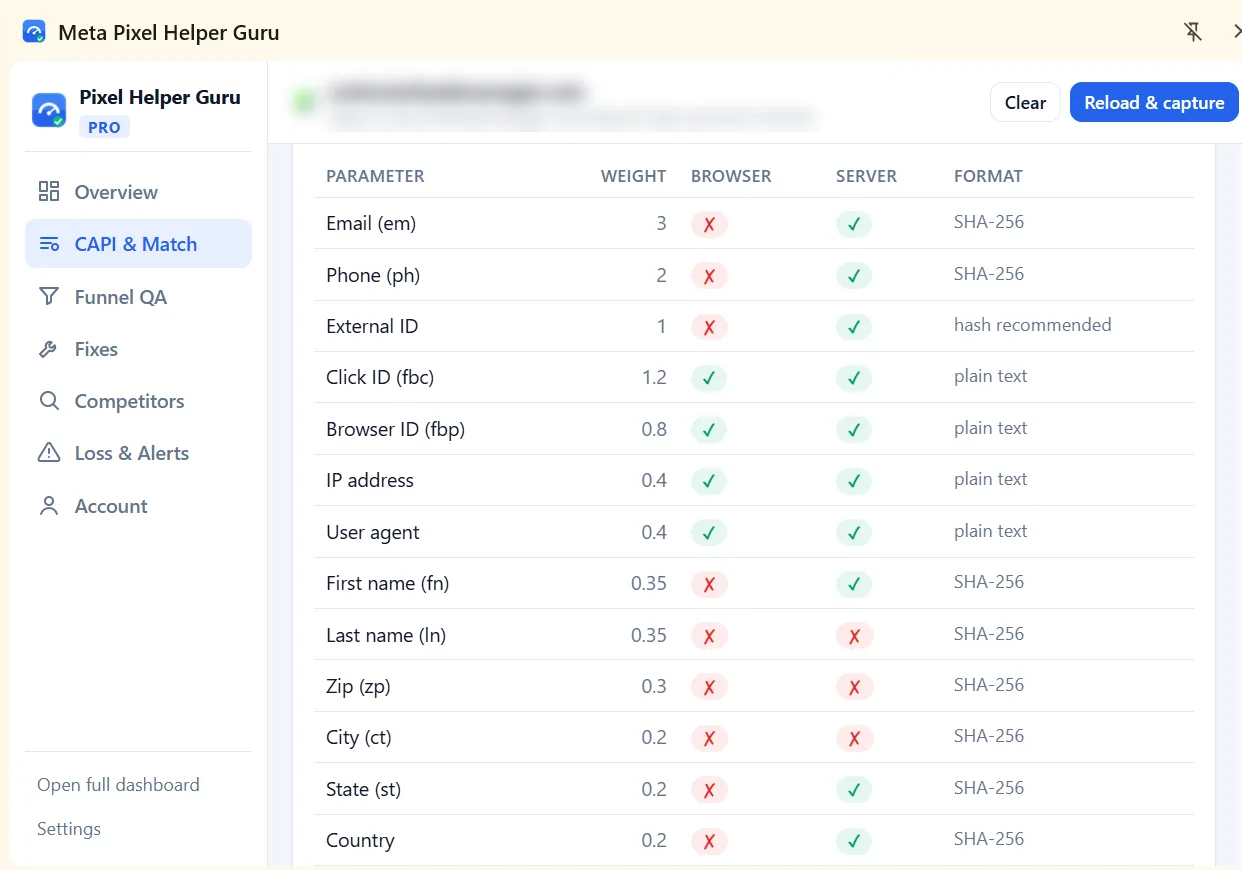
Event Match Quality (EMQ) is Meta's 0–10 score for how well the customer information on an event can be matched to a Meta account. It's based on the customer information parameters you send:
- Email (
em), phone (ph), first and last name, city, postcode and country, all normalized and hashed with SHA-256. external_id, your own customer ID (hashing recommended).fbpandfbc, the browser and click IDs from Meta's cookies, sent unhashed.- The client IP address and user agent, sent unhashed.
Deduplication and match quality work together. The browser event carries the cookies; the server event can carry the order's email and phone. If the server event doesn't also pass fbp and fbc, it loses the link to the ad click. If it isn't deduplicated, you get two partly-matched events instead of one well-matched one.
Pixel Helper Guru estimates EMQ for each event in the browser and on the observed server side, and its parameter matrix shows which keys each side sends and how they should be formatted. It's an estimate based on Meta's published parameter priorities; your real score appears in Events Manager.
How to check your setup
- Check the browser side. With a pixel helper, complete a test order and open the Purchase event. Does it have an
event_id? Is it the order number or something you can recognize? - Check the server side. Server events go from the site's server to Meta, so no browser sees them directly. Pixel Helper Guru (Pro) compares browser events with the server events it can observe: first-party relays such as server-side GTM or Stape, a CAPI payload you paste in, or the log from its free WordPress plugin. On Shopify, it can load Meta's own data quality report for the pixel with your access token.
- Compare the pairs. The CAPI & Match tab labels each event as deduplicated, browser-only or server-only, and flags mismatched names or IDs.
- Confirm in Events Manager. Use Test events with your test event code, repeat the order, and check that the browser and server copies show as deduplicated.
For the full testing routine, follow how to use a Meta Pixel Helper step by step. If events are missing entirely, start with the Facebook Pixel not working checklist. You can see all Pro features on the homepage.