 Pixel Helper Guru
A Meta Pixel Helper Alternative for Deeper Tracking Audits
Meta's free Pixel Helper answers one question well: is the pixel on this page, and did it fire? When you run ads that depend on accurate conversions, you usually need to know more. This guide explains where a basic pixel check stops and what a deeper audit adds.
What a basic pixel helper does
Meta Pixel Helper is Meta's official, free Chrome extension. It was called Facebook Pixel Helper before Facebook's parent company became Meta. When you open a page, it lists the Meta Pixels it finds, the events they send (such as PageView, AddToCart or Purchase) and the parameters attached to each event. It also warns about common errors, such as a pixel that didn't load.
For a quick "is it working?" check, that is often enough. It's free, it's made by Meta, and it's the first tool many marketers install. If that's all you need, keep using it. Pixel Helper Guru isn't a replacement for Meta's own tools, and you can run both side by side.
Why you might need more than a basic check
Most tracking problems that cost money don't show up as "pixel not found". They hide in the details:
- Double-counted conversions. If a store sends the same Purchase from the browser and from the server (Conversions API) without a matching
event_id, Meta can count it twice. Your reported ROAS looks better than it is, and the ad algorithm learns from wrong data. A browser-only helper can't see the server event, so it can't tell you whether the pair was deduplicated. - Weak match quality. Meta matches events to people using customer information such as email, phone,
external_id,fbpandfbc. Missing or badly hashed values lower Event Match Quality, which makes it harder for Meta to attribute and optimize. - Funnel gaps. A Purchase that fires without
value, or an InitiateCheckout with differentcontent_idsfrom the product page, only shows up when you follow a whole journey. - Lost events. Ad blockers, consent banners and browser privacy features block a share of browser events. You need to know which conversions still reach Meta through the server.
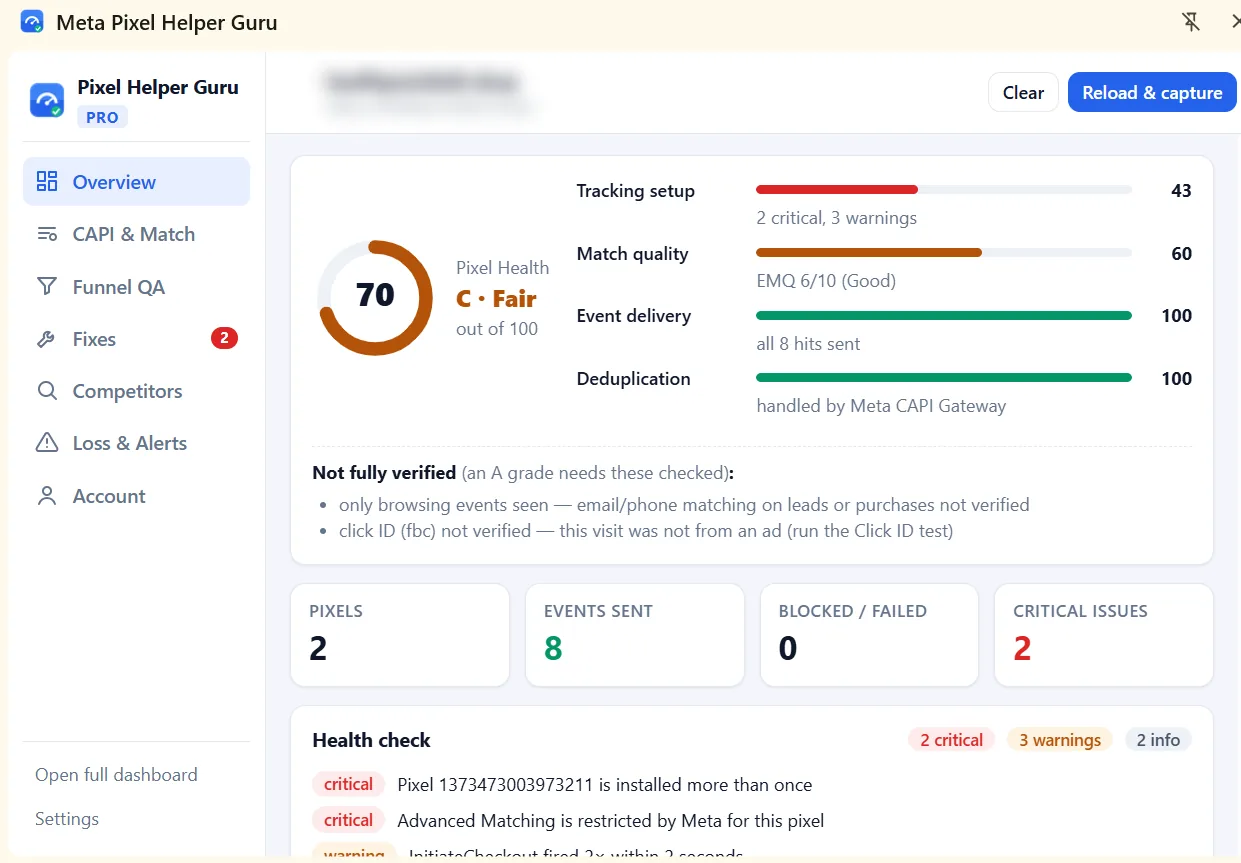
These are the questions Pixel Helper Guru was built for. It is an independent Chrome extension, not a Meta product, that adds a deeper audit on top of the live event list.
Side-by-side comparison
This table compares what each tool shows inside Chrome. Meta Events Manager, in your Meta business account, remains the source of truth for what Meta actually received.
| What you can check | Meta Pixel Helper | Pixel Helper Guru |
|---|---|---|
| Pixels on the page and events fired | ✓ | ✓ Free |
| Event parameters | ✓ | ✓ Free |
| Sent, blocked or failed status per request | Partly | ✓ Free |
| Pixel Health score with ranked issues | – | ✓ Free |
| Funnel recording across several pages | – | ✓ Free (3 pages) |
| Browser vs server (CAPI) deduplication audit | – | ✓ Pro |
| Estimated Event Match Quality per event | – | ✓ Pro |
| Fix guides with code, GTM and platform steps | – | ✓ Pro |
| Ad-blocker test and loss estimate | – | ✓ Pro |
| PDF / CSV reports and white-label | – | ✓ Pro |
| Price | Free | Free; Pro $3/mo |
Based on the features each extension shows inside Chrome as of November 2026. Meta may add features to its own tool at any time.
Event inspection
Both tools list events as they fire. Pixel Helper Guru adds the setup method (hard-coded, Google Tag Manager or a platform integration), load time, and whether each request was sent, blocked by an ad blocker or failed. That's the difference between "the event fired" and "the event reached Meta".
Deduplication
Pixel Helper Guru pairs each browser event with the server events it can observe, by event_name and event_id, and labels each one as deduplicated, browser-only or server-only. A browser can't see events that go straight from a server to Meta, so the extension uses the server traffic it can observe: first-party relays such as server-side GTM or Stape, a CAPI payload you paste in, or a log from its WordPress plugin. Read more in our guide to CAPI deduplication.
Health scoring and fixes
Instead of a list of raw warnings, you get one grade out of 100 and the issues ranked by impact. Each issue explains what was found, why it hurts results and how to fix it: corrected fbq() code, an importable GTM container, or steps for Shopify and WooCommerce.
Reporting
Agencies can export an audit as PDF, CSV or JSON, put their own logo on it, and compare it with an earlier audit to show what was fixed.
Try the deeper audit on your own store. Live event inspection and the Pixel Health score are free.
Add to Chrome, it's freeWhich one should you use?
- Use Meta Pixel Helper if you only need to confirm that a pixel is installed and that events fire.
- Use Pixel Helper Guru if you run a store or manage client accounts and need to check deduplication, match quality, a full funnel, or hand over a report.
- Use Meta Events Manager in every case to confirm what Meta received. Its Test Events tool and diagnostics show the result on Meta's side.
New to pixel helpers? Start with what a Facebook Pixel Helper is and how it works, or jump to the step-by-step testing guide. You can also see every feature on the Pixel Helper Guru homepage.